
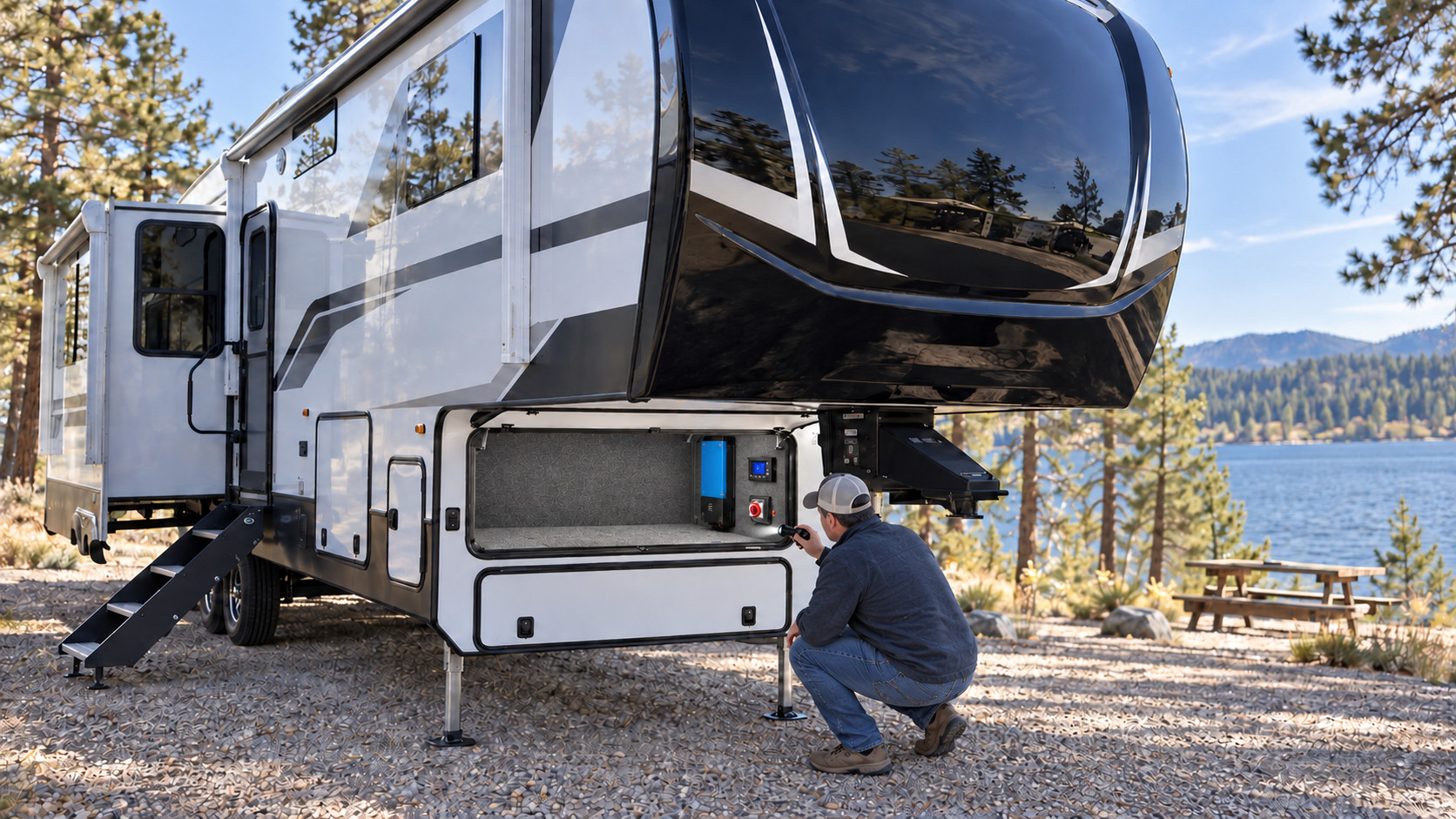
Understanding the RV converter vs inverter difference matters because both devices change electrical power, but they perform opposite jobs. Confusing the two can make electrical troubleshooting far more difficult.
The converter uses 120-volt AC power from shore power or a generator to operate the RV’s 12-volt systems and charge the house batteries. An inverter uses energy stored in the house batteries to produce 120-volt AC power for selected outlets and appliances when shore power is unavailable.
Some RVs have only a converter. Others have a separate converter and inverter. Larger or upgraded electrical systems may use a combined inverter/charger that performs both functions. For more on how 12-volt and 120-volt systems work together, see our Understanding RV Electrical Systems guide.
This guide explains how to identify each device, recognize common failure symptoms and complete basic owner-level checks. Internal repairs and testing around exposed 120-volt wiring should be left to a qualified RV technician or electrician familiar with RV systems.
RV Converter vs Inverter: Comparison
| Device | Power entering the device | Power leaving the device | Primary purpose |
|---|---|---|---|
| Converter | 120-volt AC | 12-volt DC | Powers 12-volt equipment and charges the batteries |
| Inverter | 12-volt DC | 120-volt AC | Operates selected AC outlets and appliances from the batteries |
| Inverter/charger | 120-volt AC or battery DC | 12-volt DC or 120-volt AC | Charges batteries on external power and supplies AC power from batteries |
The exact voltage, output and charging profile depend on the equipment and battery system. Always use the specifications for the devices installed in your RV.
What an RV Converter Does
The converter receives 120-volt AC electricity when the RV is connected to shore power or operating from a compatible generator.
It changes that power into lower-voltage DC electricity for equipment such as:
- Interior lights
- Water pump
- Furnace controls and blower
- Refrigerator controls
- Water-heater controls
- Vent fans
- Slide-out controls
- Awning controls
- Propane and carbon-monoxide detectors
- USB charging outlets
- Tank-monitor panel
- Other 12-volt accessories
The converter also charges the house batteries. Modern multi-stage converters may change their charging voltage according to battery condition and operating mode.
A converter does not normally provide power to household-style 120-volt receptacles. Those receptacles receive AC power from shore power, a generator or an inverter.
What an RV Inverter Does
An inverter receives DC electricity from the house batteries and changes it into 120-volt AC electricity.
Depending on the RV, an inverter may power:
- One entertainment outlet
- A television
- Residential refrigerator
- Microwave
- Selected kitchen outlets
- Bedroom outlets
- Computer equipment
- A group of branch circuits
- Most RV outlets through a larger inverter system
An inverter does not create electricity. Every watt used by an AC appliance must come from the batteries, and some energy is lost during conversion.
A high-demand appliance can draw a large amount of current from a 12-volt battery bank. Battery condition, cable size, connection quality, inverter capacity and the appliance’s starting demand all affect whether the system will operate correctly.
What an Inverter Charger Does
An inverter/charger combines an inverter and battery charger in one unit.
When shore or generator power is available, it may:
- Pass AC power through to selected RV circuits
- Charge the house batteries
- Supply 12-volt energy to the RV through the battery system
- Monitor incoming voltage and frequency
- Control an internal transfer relay
When external power is disconnected, it may automatically switch to inverter operation and supply selected AC circuits from the batteries.
An inverter/charger can have settings for battery type, charging current, incoming shore-power limit, low-voltage shutdown and power-assist functions. Incorrect programming can cause poor charging, nuisance shutdowns or battery damage.
Do not change advanced settings without understanding the battery and electrical system.
How to Determine What Your RV Has
Start with the RV’s electrical records and equipment labels.
Look for:
- Manufacturer and model number
- Converter output rating
- Inverter continuous and surge ratings
- Battery-charger rating
- Supported battery types
- Remote-control panel
- Main battery cables
- 120-volt input and output wiring
- Cooling fans and ventilation openings
- Applicable breakers and fuses
A converter is often built into or installed near the RV’s power-distribution centre. The distribution centre may contain the 120-volt circuit breakers, 12-volt fuses and converter section in one assembly.
An inverter is often mounted closer to the house batteries because its DC cables carry high current. It may be located in a front storage compartment, beneath a bed, behind a service panel or in a ventilated electrical compartment.
Do not remove covers that expose live electrical components.
Confirm Which Outlets the Inverter Powers
Not every outlet in an RV necessarily receives inverter power.
To identify the inverter-powered circuits:
- Turn off major appliances.
- Disconnect shore power.
- Make sure the generator is off.
- Turn on the inverter.
- Test the outlets using a small lamp or approved receptacle tester.
- Record which outlets remain powered.
- Turn the inverter off when testing is complete.
Do not test the inverter with a large appliance until you know the inverter’s rating and the available battery capacity.
Labeling the inverter-powered outlets can prevent confusion later.
Signs the Converter May Not Be Working
Possible converter trouble may include:
- House batteries do not charge on shore power
- Interior lights become dim even while plugged in
- The water pump or furnace becomes weak on shore power
- Battery voltage continues falling while connected
- The converter cooling fan never operates under load
- The converter repeatedly trips a breaker
- A charging-system warning appears
- The converter becomes unusually hot
- A burning smell comes from the distribution centre
- The house battery becomes overcharged or unusually warm
These symptoms can also be caused by a failed battery, blown fuse, loose connection, incorrect battery-disconnect position or poor shore-power supply.
Do not replace the converter until the surrounding system has been checked.
Basic Converter Troubleshooting
Confirm Shore Power Is Available
Before testing the converter, confirm that the RV is actually receiving acceptable AC power.
Check:
- Campsite pedestal breaker
- Shore-power cord and plug
- Surge protector or electrical management system
- RV main breaker
- Converter branch-circuit breaker
- Transfer switch, if equipped
- Generator output when testing from the generator
If the RV has no 120-volt power anywhere, the problem is probably not limited to the converter.
Check the Battery Disconnect
Some battery-disconnect arrangements separate the house battery from the converter or distribution system.
Confirm that the disconnect is in the operating position. Do not rely only on the light beside the switch. Check the RV manual to understand what the disconnect actually controls.
Inspect the 12-Volt Fuses
Check the applicable converter, battery and distribution-panel fuses.
Some converters have large reverse-polarity protection fuses. These may open if the battery cables were connected backward, even briefly.
Replace a fuse only with the specified type and rating. If the replacement fuse immediately opens, stop and find the cause.
Never install a larger fuse to prevent it from blowing.
Check the Battery Voltage
A multimeter can help determine whether the charging system is increasing battery voltage, but the expected reading depends on:
- Battery chemistry
- Battery state of charge
- Converter charging stage
- Temperature compensation
- Loads operating in the RV
- Solar charging
- Other connected chargers
Measure the battery at rest and again after connecting shore power. A working charger should normally change the battery voltage according to its programmed charging stage.
Consult the converter and battery manuals for the correct voltage range. Do not assume a charging voltage suitable for flooded lead-acid batteries is correct for lithium batteries.
Listen for the Converter Fan
Many converter fans operate only when temperature or electrical load requires cooling. A fan that is not running does not automatically indicate converter failure.
However, a fan that runs continuously, becomes unusually loud or fails to operate while the converter overheats may indicate blocked airflow, heavy load or an internal problem.
Turn off power before removing dust from accessible exterior vents. Do not insert tools into the converter.
The Converter Works but the Battery Does Not Charge
If the RV’s 12-volt equipment works normally on shore power but the battery does not charge, check the path between the converter and battery.
Possible causes include:
- Battery disconnect is open
- Battery cable is loose
- Battery terminal is corroded
- Main battery fuse has opened
- Resettable DC breaker has tripped
- Battery-management system has disconnected
- Battery temperature protection is active
- Incorrect charging profile is selected
- Battery has an internal failure
- Wiring between the converter and battery is damaged
- Converter output is too low under load
Lithium batteries may disconnect internally when they are too cold, deeply discharged or outside another protection limit. Follow the battery manufacturer’s recovery instructions. For more on battery types and charging, see our RV Battery Maintenance guide.
Do not bypass a battery-management system or protection device.
Signs the Inverter May Not Be Working
Possible inverter trouble may include:
- Inverter-powered outlets are dead
- Inverter remote panel will not turn on
- Inverter shuts down as soon as a load starts
- Microwave or refrigerator will not operate from the batteries
- Low-battery warning appears
- Overload warning appears
- Over-temperature warning appears
- Inverter repeatedly resets
- GFCI receptacle trips
- Inverter fan runs continuously
- Shore power works but inverter power does not
- Inverter works but shore power will not pass through
These symptoms do not always mean the inverter has failed. The problem may involve the batteries, cables, breakers, transfer relay, remote control or connected appliance.
Basic Inverter Troubleshooting
Confirm the Inverter Is Turned On
Some inverters have a switch on the unit and a separate remote panel. Others enter standby or search mode when loads are small.
Check:
- Main inverter switch
- Remote-control setting
- Battery-disconnect position
- Inverter DC fuse
- DC breaker
- Fault display
- Low-voltage shutdown
- Search or standby settings
Do not assume the inverter is operating simply because its display is illuminated.
Check the Battery State of Charge
An inverter may switch off when battery voltage falls below its programmed limit.
A battery can show acceptable voltage without a load and then collapse when a microwave, coffee maker or other large appliance starts. This may indicate:
- Discharged battery
- Weak battery
- Undersized battery bank
- Loose connection
- Corroded terminal
- Undersized cable
- Excessive cable length
- Faulty battery-management system
- Appliance demand greater than the system can support
Check the batteries and connections before replacing the inverter.
Check the Inverter Fuse and Breaker
Large inverters normally have overcurrent protection near the battery bank. A fuse may appear physically intact while being electrically open.
Do not bypass the fuse or substitute a higher rating. These devices protect large battery cables capable of carrying dangerous current.
Fuse testing or replacement should follow the inverter manufacturer’s instructions.
Reduce the AC Load
Turn off or unplug the connected appliances and restart the inverter.
Add one load at a time. If the inverter operates normally until a particular appliance starts, compare the appliance’s running and startup requirements with the inverter’s continuous and surge ratings.
Appliances with motors or compressors may require a brief startup surge that is much higher than their running demand.
Check for Overheating
Inverters need unobstructed airflow.
Inspect the installation for:
- Blocked cooling openings
- Stored items against the inverter
- Dust buildup
- Failed cooling fan
- High compartment temperature
- Loose mounting
- Operation near another heat-producing device
Do not cover an inverter to reduce fan noise. Restricting airflow can cause repeated shutdowns or permanent damage.
Check the GFCI Protection
Some inverter circuits include a GFCI receptacle on the inverter, in the bathroom, kitchen, exterior compartment or another location.
A tripped GFCI can make several downstream outlets appear dead.
Reset the GFCI only after removing the connected loads. If it trips again, investigate the appliance, wiring and moisture conditions rather than repeatedly resetting it.
The Inverter Shuts Down Under Load
An inverter that operates with no load but shuts down when an appliance starts may be experiencing:
- Low battery voltage
- Weak battery capacity
- Excessive appliance demand
- Inadequate surge capacity
- Loose or undersized battery cables
- Overheated connections
- Inverter overload
- High internal temperature
- A defective appliance
- An incorrectly programmed shutdown setting
A coffee maker, microwave, hair dryer, electric kettle or air conditioner can place a heavy demand on the battery system.
Turning off one appliance may allow another to operate, but it does not increase the inverter’s rating or battery capacity.
Shore Power Works but Inverter Outlets Are Dead
If selected outlets work on shore power but fail when shore power is disconnected, check:
- Inverter operating switch
- Battery state of charge
- Inverter fault codes
- DC fuse or breaker
- Remote-control setting
- Inverter output breaker
- Downstream GFCI
- Transfer relay
- Whether those outlets were designed for inverter power
Some RV outlets are intentionally excluded from the inverter system to prevent high-demand equipment from draining the batteries.
Inverter Power Works but Shore Power Will Not Pass Through
A combined inverter/charger may pass shore or generator power through an internal transfer relay.
If inverter power works but external power does not reach the inverter-fed circuits, possible causes include:
- No AC power reaching the inverter
- Tripped inverter input breaker
- Tripped inverter output breaker
- Loose AC connection
- Incoming voltage outside the permitted range
- Generator frequency problem
- Incorrect shore-current setting
- Transfer relay failure
- Internal inverter/charger fault
Testing the internal AC connections or transfer relay exposes hazardous voltage and should be performed by a qualified technician.
Avoid Overloading the Inverter
The inverter’s wattage rating is not the same as the battery bank’s usable capacity.
An appliance may be within the inverter’s wattage rating but still discharge the batteries rapidly.
For a basic estimate, divide the AC appliance wattage by the battery-system voltage, then account for inverter losses. For example, a 1,200-watt appliance can require well over 100 amps from a nominal 12-volt battery system.
Actual current depends on battery voltage, inverter efficiency, wiring losses and appliance behaviour.
High-current loads require:
- Adequate battery capacity
- Correctly sized battery cables
- Proper overcurrent protection
- Secure connections
- Suitable inverter capacity
- A battery chemistry capable of delivering the required current
Do not add a larger inverter without evaluating the entire battery and electrical system.
Match the Charger to the Battery
The converter or inverter/charger must use a charging profile compatible with the house batteries.
Battery types may include:
- Flooded lead-acid
- Absorbed glass mat
- Gel
- Lithium iron phosphate
Each chemistry has different charging requirements. Some lithium batteries also restrict charging below certain temperatures.
An incorrect charging profile can cause:
- Incomplete charging
- Reduced battery capacity
- Excessive gassing
- Water loss
- Battery overheating
- Premature battery failure
- Battery-management-system shutdown
- Low-temperature lithium charging damage
Check the battery and charger documentation before changing battery chemistry or installing a replacement converter.
A charger advertised as lithium compatible may still require a switch, jumper, programming change or remote setting.
Maintain the Converter and Inverter
Converters and inverters generally require little physical maintenance, but their operating environment matters.
Periodically:
- Keep ventilation openings clear
- Remove stored items from around the equipment
- Look for dust or insect activity
- Check for water intrusion
- Listen for abnormal fan noise
- Inspect accessible cables for damage
- Check battery connections
- Watch for discolouration or melted insulation
- Record fault codes
- Confirm charging performance
- Test inverter-powered outlets
- Review programmed battery settings
Turn off all power sources before touching accessible connections. This may include shore power, generator power, solar input, inverter output and battery power.
Solar panels may continue producing electricity whenever they receive light. Follow the solar-equipment shutdown procedure when applicable.
Converter and Inverter Troubleshooting Checklist
If the Batteries Are Not Charging
- Confirm shore or generator power
- Check the converter breaker
- Check the battery disconnect
- Inspect the applicable fuses
- Check the main battery fuse or DC breaker
- Inspect battery connections
- Verify the charging profile
- Compare battery voltage before and after connecting power
- Check for converter fault indicators
If Inverter Outlets Are Dead
- Confirm the inverter is on
- Check battery state of charge
- Read the inverter fault display
- Check the inverter DC fuse or breaker
- Reset the output breaker if appropriate
- Check downstream GFCI receptacles
- Remove excessive loads
- Confirm that the outlet is intended to receive inverter power
When the Inverter Shuts Down
- Reduce the AC load
- Check for low battery voltage
- Inspect battery connections
- Look for overheating
- Clear blocked ventilation
- Check the appliance’s startup demand
- Record the fault code
- Compare the load with the inverter rating
When to Contact a Qualified Technician
Arrange professional service if you find:
- Burnt wiring or melted connectors
- Repeatedly blown fuses
- Repeated breaker or GFCI trips
- Loose internal AC wiring
- Unstable charging voltage
- Battery overheating
- Damaged high-current battery cables
- Transfer-switch failure
- Inverter output with abnormal voltage or frequency
- Converter overheating
- Water inside electrical equipment
- A fault that returns after the loads are removed
- A need to resize cables, batteries, fuses or the inverter
- Uncertainty about safely isolating every power source
Converters, inverters and inverter/chargers connect several parts of the RV electrical system. Correct troubleshooting begins by identifying whether the problem affects AC power, DC power, battery charging or inverter-fed outlets.
The converter changes AC power into DC power and charges the batteries. The inverter changes battery DC power into AC power. Once that distinction is clear, the symptoms become much easier to trace. For help identifying specific problems, see our RV Troubleshooting guides. For more industry safety guidance, see the RV Safety & Education Foundation.